
Battery swelling is one of the most dangerous faults of used iPhones. It is essentially damage to the internal structure of the battery cell, which may cause safety accidents such as fire, explosion, and leakage. Mastering the causes, accurate detection methods, emergency handling plans, and prevention measures of swelling can timely detect potential safety hazards and avoid personal and property losses.
Core Causes of Battery Swelling
(In-Depth Analysis, From Principles to Cases)
The essence of battery swelling is gas generation inside the battery, leading to cell expansion. The gas mainly comes from electrolyte decomposition, lithium plating, short circuits, and other issues. The specific causes are as follows:
1. Cell Aging and Overcharge/ Overdischarge (Most Common Cause)
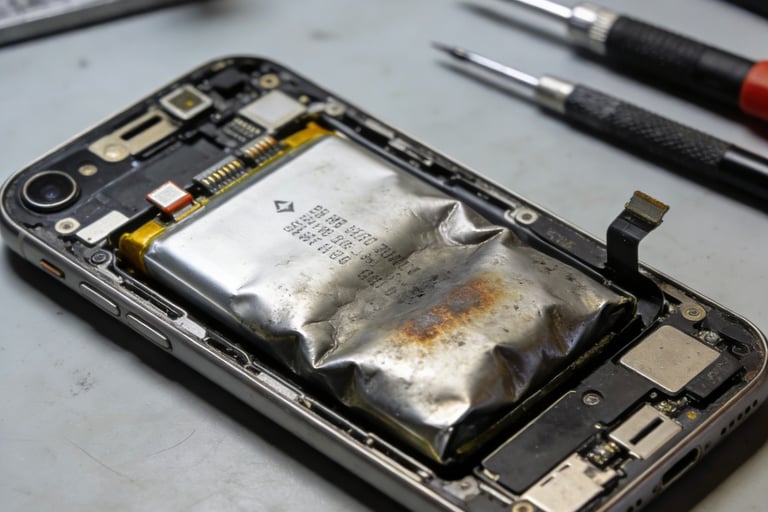
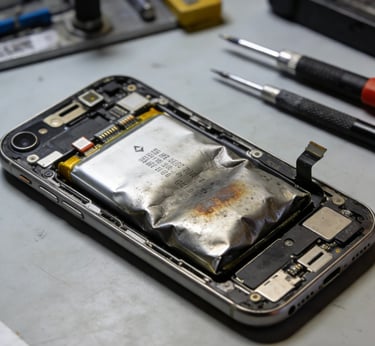
Swelling due to aging: After long-term charging and discharging of the cells in used iPhone batteries, the structure of the electrode materials is damaged. The electrolyte reacts with the damaged electrodes, decomposing to produce gases such as hydrogen and oxygen. These gases accumulate in the sealed battery case, causing swelling. Data shows: For used batteries that have been used for more than 3 years with cycle counts >800, the swelling probability is as high as 30%-50%.
Swelling due to overcharge/overdischarge: Long-term overcharging (continuing to charge for hours after reaching 100%) or deep discharge (continuing to use after power drops below 5%) accelerates electrolyte decomposition and lithium plating. During overcharging, the battery voltage exceeds the safe threshold of 4.2V, and the electrolyte decomposes violently to produce a large amount of gas; during deep discharge, lithium plating on the negative electrode forms metallic lithium deposits, which pierce the separator, causing internal short circuits, generating gas accompanied by heat, and triggering swelling.
Case: A user's iPhone 8 has been used for 4 years with 900 cycles. They often leave it charging overnight (overcharging). One day, they found the phone's back cover raised and the battery severely swollen. Detection showed the battery's internal resistance reached 120mΩ, the cells were completely aged, and gas accumulation inside caused swelling.
2. Low-Quality Batteries and Unofficial Replacement (High-Risk Cause)
Inherent defects of low-quality batteries: To reduce costs, some second-hand merchants use refurbished batteries or batteries assembled with low-quality disassembled cells. These batteries have poor cell consistency, unqualified electrolyte quality, and shoddy shell sealing processes. Swelling may occur within 1-3 months of use, with a probability of over 60%.
Improper operation during unofficial replacement: When replacing batteries at non-professional repair shops, the following problems may cause swelling:
① Incorrect installation (mismatched battery model, over-tightened fixing screws squeezing cells);
② Damage to the battery protection board (leading to failure of overcharge protection);
③ Using non-original adhesive for fixation, poor sealing, and moisture entering the battery to trigger reactions.
Case: After replacing a third-party battery at a roadside repair shop, the user's iPhone XR swelled within 2 months, and the screen was lifted. Detection found the battery was assembled with refurbished cells, had low-quality electrolyte, and the screws were over-tightened during installation, squeezing the cells and accelerating swelling.
3. High-Temperature Environment and External Damage (Inductive Causes)
High temperature accelerates swelling: The cells of used iPhone batteries are already aged. High-temperature environments (such as direct sunlight, car exposure, playing large games while charging) will accelerate the electrolyte decomposition rate, multiplying gas production. Batteries that were not swollen may swell rapidly in a short time. Experimental data: Batteries used in a 45℃ environment swell 5-8 times faster than in room temperature.
Swelling due to external damage: When the phone is dropped, squeezed, or collided, the battery shell or internal separator may be damaged, leading to cell short circuits or electrolyte leakage, triggering local reactions to produce gas and form swelling. Even if the external damage is not obvious, the internal separator may be damaged, and swelling will gradually occur during subsequent use.
Case: The user's iPhone 11 accidentally fell, with no obvious damage to the body, but swelling was found 1 month later. Disassembly detection revealed that the battery separator was pierced by tiny metal debris (generated during the fall), causing a slight internal short circuit, gas accumulation, and eventual swelling.
4. Battery Manufacturing Defects (Rare but Fatal)
Some original batteries or regular third-party batteries have production process defects (such as uneven electrode coating, uneven separator thickness, missing sealant). These defects are not detected at the factory. After a period of use (especially after second-hand circulation), the defects are exposed, triggering electrolyte decomposition or short circuits, leading to swelling. The probability of such swelling is low (<5%), but it occurs suddenly with no obvious warning signs.
Accurate Detection Methods for Battery Swelling
(Scenario-Specific Operation, Comprehensive Inspection)
Swelling may not be obvious in the early stage. It is necessary to master multi-dimensional detection methods to detect potential hazards in a timely manner:
1. Visual Appearance Detection (Easiest to Operate, Suitable for Ordinary Users)
Operation Steps:
① Bare Phone Detection: Remove the phone case, observe if the phone body is deformed, focusing on: gaps between the screen and middle frame (whether enlarged or uneven), whether the back cover is raised (especially obvious for glass back cover models), and whether the camera module is protruding (swelling will lift the camera);
② Touch Detection: Gently press the back of the phone (battery position) with fingers to feel for elasticity or protrusion. A normal battery is hard with no elasticity when pressed, while a swollen battery will have obvious rebound when pressed. In severe cases, the protrusion can be directly felt;
③ Comparison Detection: Compare the phone with a normal phone of the same model, observing the body thickness and back cover flatness. If it is significantly thicker or uneven, the battery is likely swollen.
Grading Standards:
Mild Swelling: No obvious body deformation, slight elasticity when pressed, no significant increase in screen/back cover gaps—no safety risk but requires close monitoring;
Moderate Swelling: Slight body deformation, enlarged screen/back cover gaps, obvious elasticity when pressed—potential safety risk, need to stop using immediately;
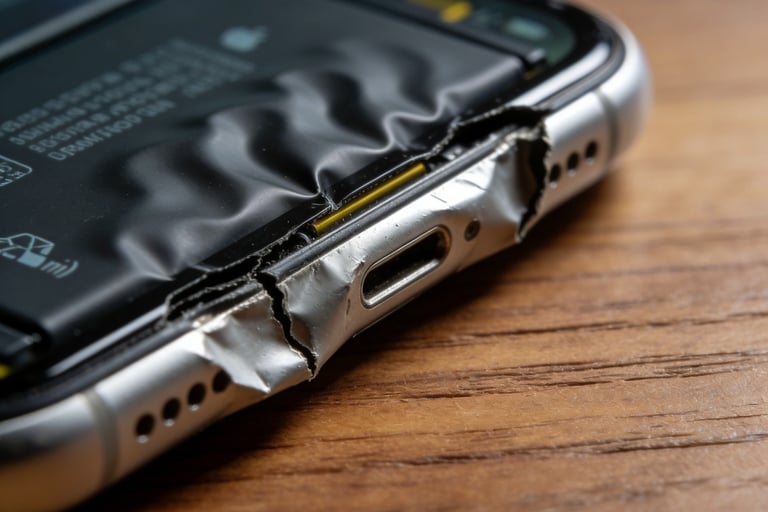
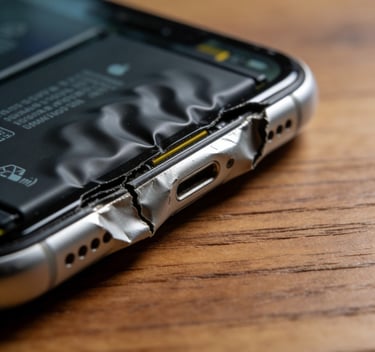
Severe Swelling: Severe body deformation, raised back cover, lifted screen, strong rebound when pressed, or even visible battery shell protrusion—may cause leakage or fire at any time, requiring emergency handling.
2. Tool-Assisted Detection (Precise Quantification, Suitable for Professional Users)
Tools: Thickness Caliper (precision 0.01mm), Infrared Thermometer
Operation Steps:
① Thickness Detection: Use the caliper to measure the thickness of the phone body (battery area) and compare it with a normal phone of the same model. If the thickness increases by more than 0.5mm, swelling exists; an increase of more than 1mm indicates moderate swelling; an increase of more than 2mm indicates severe swelling;
② Temperature Detection: Use the infrared thermometer to measure the temperature of the battery area. The temperature should be <35℃ during normal use and <40℃ during charging; if the temperature continues to be >35℃ when not in use or under light use, accompanied by body heating, it may be a precursor to swelling (heat generated by internal short circuits);
③ Internal Resistance Detection: Use an internal resistance tester to measure the battery's internal resistance. If the internal resistance suddenly increases by more than 20mΩ within 1 month, accompanied by abnormal heating and sudden battery life drop, it may be caused by internal reactions in the early stage of swelling.
3. Usage Status Monitoring (Indirect Judgment, Suitable for Daily Inspection)
Indirectly judge whether there is a swelling hazard through abnormal performance during phone use:
Abnormal Battery Life: Sudden sharp drop in battery life (e.g., running out within 1 hour of full charge) accompanied by body heating;
Abnormal Charging: Extremely slow charging, frequent interruptions during charging, or severe heating of the charger/phone;
Abnormal Body Performance: Automatic restart, lagging, or screen touch failure (caused by swelling pressing the screen);
Abnormal Odor: A pungent chemical smell from the phone (smell of electrolyte leakage) is a sign of severe swelling—shut down immediately.
Emergency Handling Plans for Battery Swelling
(Level-Specific Operation, Eliminate Risks)
After discovering battery swelling, take corresponding measures according to the swelling level to avoid risk escalation:
1. Mild Swelling (Monitoring + Maintenance to Avoid Deterioration)
Handling Steps:
① Immediately stop overcharging and deep discharge, adopt the "shallow charge and discharge" strategy (20%-80% charging range), disable fast charging, and switch to 5W slow charging;
② Avoid high-power consumption scenarios and high-temperature environments, turn off 5G and background refresh to reduce battery heating;
③ Inspect the swelling situation (appearance + thickness) every 3 days. If there is no deterioration within 1 month, it can continue to be used, but the monitoring cycle should be shortened to once a day; if deterioration occurs (increased thickness, intensified heating), stop using immediately.
2. Moderate Swelling (Immediate Disuse + Professional Replacement)
Handling Steps:
① Emergency Operation: Shut down immediately, stop charging and use, avoid squeezing or colliding the phone, and keep it away from fire sources, water sources, and flammable and explosive materials;
② Replacement Preparation: Contact Apple's official after-sales service or a regular repair shop, explain the battery swelling situation, and make an appointment to replace it with an original battery. Do not disassemble or replace it with a third-party battery by yourself;
③ Transportation Notes: Wrap the phone with soft paper towels or foam when sending for repair to avoid battery compression. Do not put the phone in a pocket or backpack mixed with other items to prevent aggravated swelling.
3. Severe Swelling (Emergency Handling + Safe Disposal)
Handling Steps:
① Extreme Risk Control: Shut down immediately, place the phone in an open, fireproof area (such as a tile floor, metal basin), away from people, furniture, curtains, and other combustibles, and keep it ventilated;
② Prohibited Operations: Do not press, pierce, or heat the swollen battery; do not attempt to charge or turn it on; do not disassemble the battery by yourself (the internal electrolyte is corrosive, and the gas may be flammable and explosive);
③ Professional Disposal: Contact Apple's official after-sales service or a professional battery recycling agency, explain the situation, and request on-site pickup and disposal. Do not discard it randomly (swollen batteries are hazardous waste and require professional recycling);
④ Emergency Situation: If the battery smokes or catches fire, immediately extinguish it with a dry powder fire extinguisher (do not use water) and call 119 for help.
Prevention Measures for Battery Swelling
(Must-See for Used iPhone Users)
1. Source Control: Avoid Purchasing High-Risk Batteries
Reject low-quality batteries: When purchasing a used iPhone, prioritize devices with original, unreplaced batteries. Ask the merchant to provide battery health, cycle count, and internal resistance test reports. Avoid purchasing devices with replaced third-party batteries or refurbished batteries;
Inspect battery status: For offline purchases, on-site inspect the battery's appearance (signs of swelling or leakage), body flatness, and use iMazing to query the battery's cycle count and health. Ensure the cycle count is <500 and health is ≥70%;
Choose regular channels: Purchase through official refurbished stores or large second-hand platforms (supporting disassembly inspection). Avoid low-priced devices from roadside shops or individual sellers to reduce the probability of purchasing batteries with swelling risks.
2. Usage Habits: Reduce Swelling Triggers from the Source
Standardize charging: Avoid overcharging (charge to 80%-90% only) and deep discharge (charge in a timely manner when power is ≥20%). Enable the "Optimized Battery Charging" function for overnight charging. Use original or MFi-certified accessories for charging;
Control temperature: Avoid using or charging in high-temperature environments (direct sunlight, cars, outdoor high temperatures). Place the phone in a well-ventilated place when charging, do not wrap it in clothes or quilts, and avoid playing large games while charging;
Avoid damage: Use a phone case to protect the phone from drops, squeezing, and collisions, especially avoiding external impacts on the battery area.
3. Regular Monitoring: Detect Potential Hazards Timely
Appearance monitoring: Inspect the phone's body flatness and screen/back cover gaps once a week. Handle abnormalities immediately;
Data monitoring: Use iMazing to query the battery's cycle count, health, and internal resistance every 3 months. If the health drops by more than 1% per month or the internal resistance suddenly increases by more than 20mΩ, focus on monitoring;
Professional inspection: Conduct a comprehensive battery inspection (including capacity, internal resistance, and sealing status) at a regular repair shop every year to detect potential hazards in advance.
4. Timely Replacement: Avoid Swelling of Aged Batteries
Proactively replace the battery when the used iPhone battery shows the following conditions to avoid swelling risks:
Health <70% or cycle count >800;
Internal resistance >90mΩ, accompanied by sudden battery life drop and abnormal heating;
Used for more than 3 years—even if health and cycle count are normal, replacement is recommended (cells have entered the accelerated aging period).
